How to play Design Your Tube
Design Your Tube makes interface design into a playable creative sandbox. Arrange and customize the components of a fictional mobile video app without writing code. Switch between screens, change visual themes and try a working offline presentation with sample videos and comments. The content is simulated; the game never accesses your real video account.

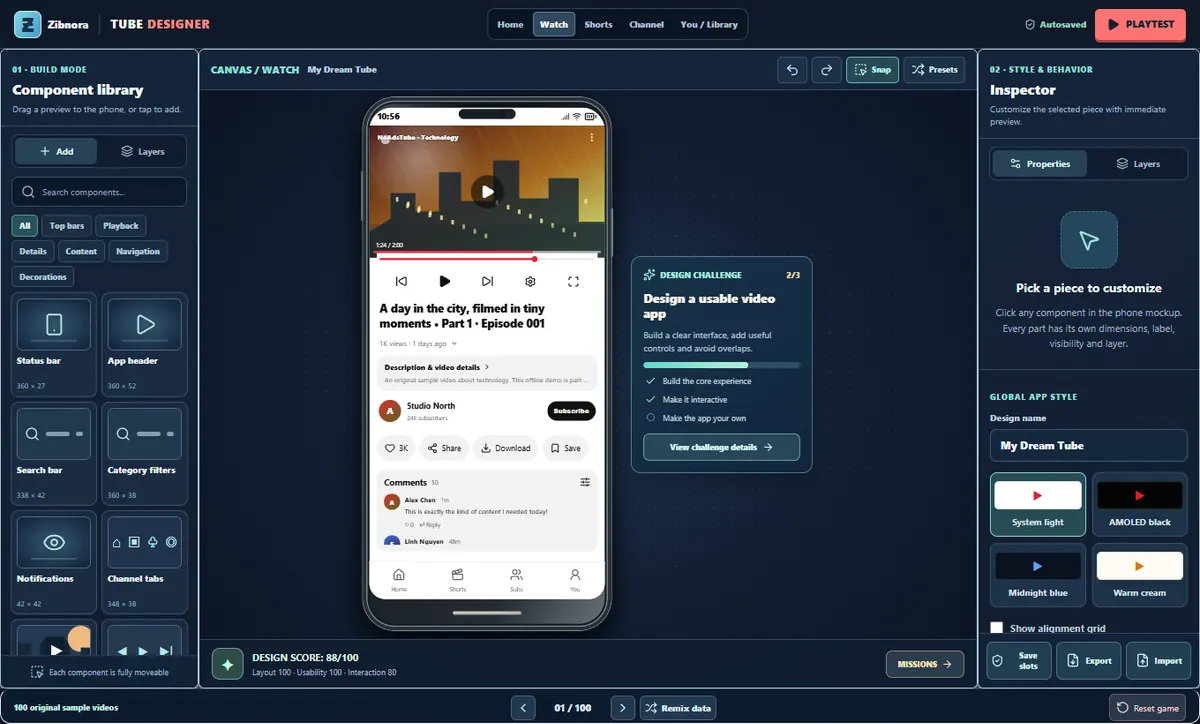
How to play — step by step
- 01
Choose a phone screen
Start with Home, Watch, Shorts, Channel or Library. Each screen has its own independently editable arrangement.
- 02
Drag and customize the interface
Add elements from the component shelf, resize or move them, hide unwanted sections and adjust colors or appearance.
- 03
Present your creation
Switch to playtest mode to tap around the fictional app. Explore mock videos, try the controls and export your design as JSON if you want to keep it.
What makes this game different?
- More than sixty configurable interface components
- Five independent mobile screens
- One hundred fictional demo videos and comments
- Theme presets, undo, JSON export and presentation mode
Tips for your next run
- Keep your most important controls easy to reach on the phone preview.
- Playtest a screen after making large layout changes to check how it feels.
Common questions
Does this connect to YouTube?
No. It is an independent offline interface simulator with fictional videos and comments.
Can I save my layout?
Yes. The editor supports saved designs and JSON export for reuse.